How Pay Is Calculated
Microkeeper works out each employee's pay from their approved timesheets and your pay rules. Each type of pay rule pays one part of an award, such as the base rate, a casual loading, a late night penalty or an allowance. Every shift is paid by the rules that match it, and each one becomes a line on the payslip.
| Required plan | All plans |
|---|---|
| Required access | To set up pay rules: Settings and Payroll - Full Access |
Pay rules are under Menu > Settings > Payroll Rules.
Pay rules workflow in Microkeeper
Set each employee's base rate
The hourly rate every other rule builds on.
- Enter an hourly rate on each employee's profile. See Employees.
- Or put staff on a Rate Rule, a rate for each award level that follows their age and years of service. See Rate Rules.
- Put staff paid under different conditions, such as a second award, in a Group. See Groups.
Pay the hours
Rules for loadings, penalties and overtime.
- Shift Rules pay casual loadings, weekend and late night penalties, daily overtime and worked public holidays. See Shift Rules.
- Weekly Rules pay overtime once weekly hours pass a limit, such as 38. See Weekly Rules.
- Break Rules take unpaid breaks out of shifts. See Break Rules.
- Max Spread Rules join split shifts into one shift. See Max Spread Rules.
Add allowances and deductions
Payments and amounts that aren't hours.
- Extra Rules pay allowances, such as tool, laundry and split shift allowances. See Extra Rules.
- Expense and Deduction Rules take amounts before or after tax, such as salary sacrifice or union fees. See Deductions and Expenses.
Check, then pay
Test the rules before a real pay run.
- Try shifts in the Free Award Pay Calculator while you're logged in. It uses your own rules.
- Process the pay run and check each payslip's lines. See Run a Pay Run.
If your staff are paid under your own pay agreement, such as an enterprise agreement, see Set Up Your Own Pay Agreement for which rule pays each clause, and a worked example from start to finish.
The order Microkeeper works out pay
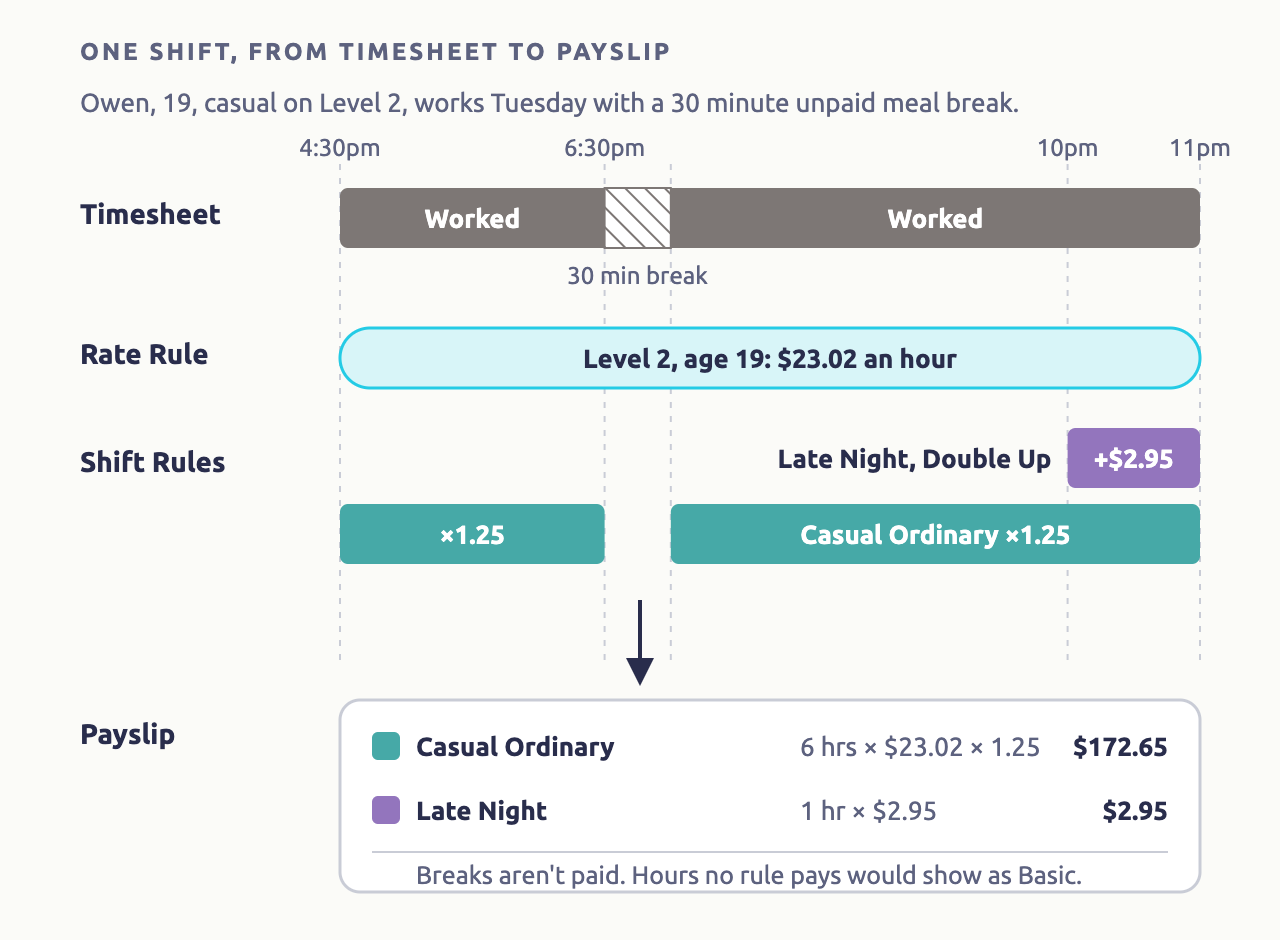
When you process a pay run, each employee's shifts are worked out in this order:
- Shifts are put together. Shifts close together are joined into one if a Max Spread Rule allows it, and Break Rules decide which breaks are unpaid.
- The base rate is set. It's the rate from the employee's Rate Rule, or the hourly rate on their profile if they don't have one.
- Shift Rules pay the hours. They're checked in order, by tab and then by Priority. The first rule that matches an hour pays it, and later rules only pay the hours left. A rule set to Double Up pays on top instead, for penalties like late night work.
- Weekly Rules move overtime. When a Shift Rule has a Weekly Rule, the hours past the weekly limit are paid at the Weekly Rule's rate instead.
- Hours no rule paid are paid as Basic, at the base rate. If the employee has a Saturday or Sunday rate on their profile and no Rate Rule, Basic hours on those days use it.
- Extra Rules add allowances.
- Super, expenses, tax and deductions are worked out from the payslip's lines.
- Leave builds up from the ordinary hours paid.
Leave and unworked public holidays are paid in step 3, by the rules on the Shift Rules Leave Rules and Unworked PH tabs, or at the base rate if none match. See How Leave Works.
Which employees each pay rule applies to
Every rule can be limited to a Group or one employee. Some can be limited further:
| Rule | Can be limited by |
|---|---|
| Rate Rules | Chosen on each employee's profile, one per employee. Each clause can depend on age, years of service and Job. |
| Shift Rules | Group or employee, Employment Type, day, time, Location, Role and Job. |
| Weekly Rules | Only apply through the Shift Rules they're added to. |
| Break Rules | Group, day and shift length. |
| Max Spread Rules | Group and Employment Type. |
| Extra Rules | Group or employee, day, start or end time and Job. |
| Expense and Deduction Rules | Group or employee. |
A rule for one employee or Group doesn't override a rule for everyone. Shift Rules are paid by the first rule that matches, so put the more specific rule above the general one.
How a payslip line's Class changes super and leave
Each rule has a Class, which decides whether its pay attracts super and builds up leave:
| Class | Used for | Super | Builds up leave |
|---|---|---|---|
| Normal | Ordinary hours, loadings and weekend penalties | Yes | Yes |
| Overtime | Overtime | Only if the employee's Super Ordinary Hours is On total hours | No |
| Bonus | Penalties on top of the hours, such as late night work, and task allowances, such as first aid | Yes | No |
| Allowance and Extra | Expense allowances, such as tool and laundry | No | No |
| Taxfree Allowance and Reimbursement | Amounts that aren't taxed | No | No |
For every Class, including Reimbursement and Workers Comp Entitlements, how each affects ordinary hours and tax, and how a leave payment's Class changes balances, see the Payments Classification Chart.
Each rule also has an STP Category, which reports its pay to the ATO. See Single Touch Payroll.
Pay rules guides
Rate Rules
A rate for each award level, by age and years of service.
Shift Rules
Loadings, penalties, overtime and public holidays.
Weekly Rules
Overtime after a weekly or cycle limit.
Break Rules
Unpaid and paid breaks, and breaks staff skip or add.
Max Spread Rules
Split shifts paid as one shift.
Extra Rules
Allowances and other extra payments.
Public Holidays
Public holiday rates, and adding or skipping holiday dates.
Time in Lieu and RDOs
Banking hours to take as time off later.
Deductions and Expenses
Amounts taken before or after tax.
Your Own Pay Agreement
Set up an enterprise or custom agreement, clause by clause.
What pay rules rely on
- Approved timesheets: pay rules work on the shifts in each timesheet. See Timesheets.
- Each employee's profile: their hourly rate, Employment Type and date of birth. See Employees.
- Groups: to give a rule to some staff and not others.