How Super Works
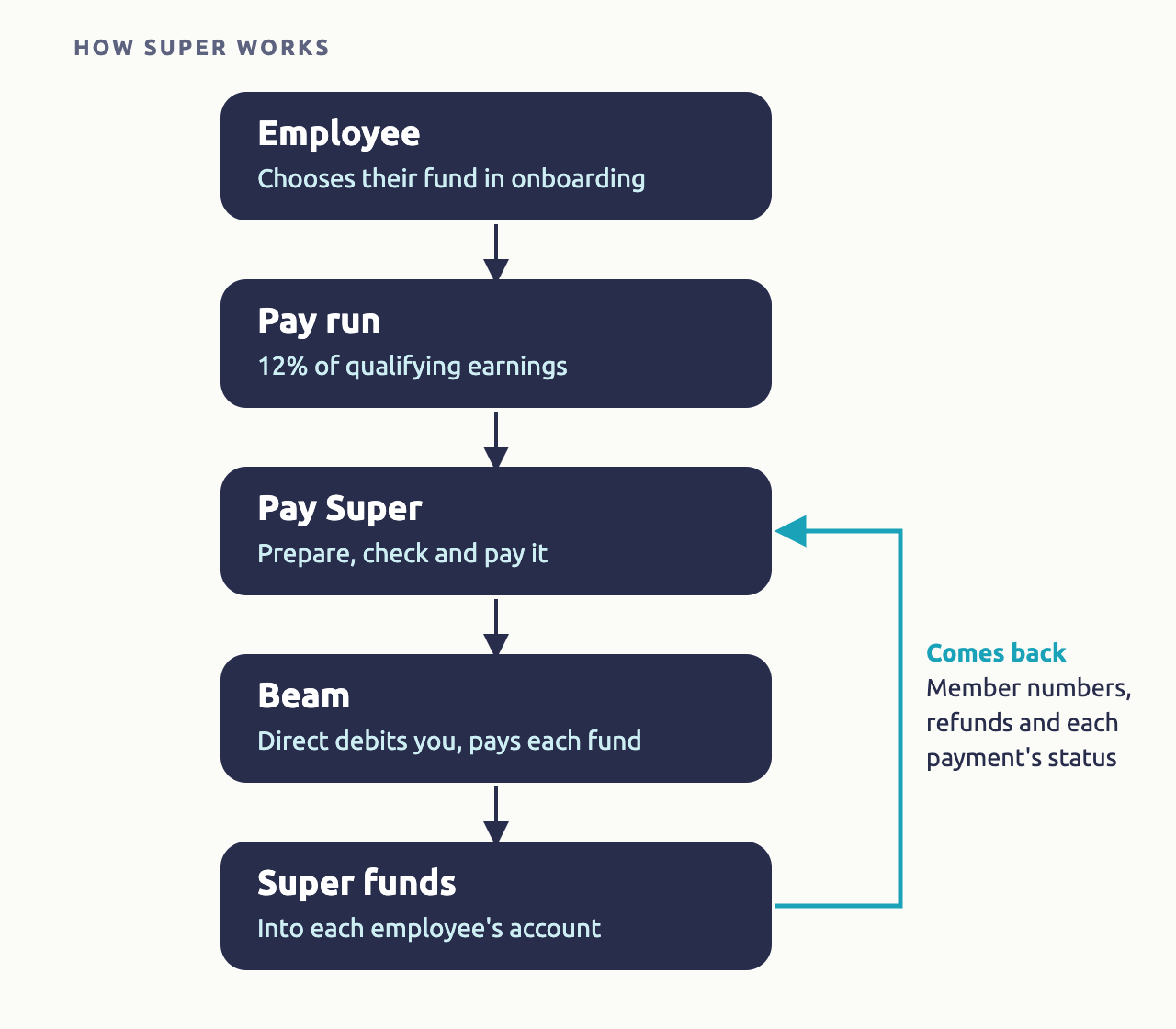
Each pay run works out every employee's super guarantee: 12% of their qualifying earnings, shown on their payslip. You then pay it from the same pay run, on payday, through the Beam super clearing house: Beam takes the total from your bank account by direct debit and pays each employee's fund.
| Required plan | All plans |
|---|---|
| Required access | To pay super: Payroll - Full Access |
Super workflow in Microkeeper
Set up super
Once, before your first super payment.
- Sign up to Beam, and choose your default fund. See Set Up Super.
- Verify the bank account super is paid from.
Staff choose their fund
Each employee's fund and member number.
- New staff choose their fund in onboarding. See Onboarding.
- Or enter it under Super Fund Details on their profile. See Set Up Super.
Pay super from the pay run
Pay it with the pay run, through Beam.
- In Complete Payrun, click 4. Pay Super, prepare the submission and pay it. See Paying Super.
Follow up
Check each payment reached the funds.
- Track each payment in the Process Log, and fix member numbers and refunds. See Paying Super.
How super is worked out on a payslip
Super is the Super Guarantee Rate of the employee's qualifying earnings. The rate is in Menu > Settings > General > Global, under Super Settings, and Microkeeper updates it when the law changes.
Qualifying earnings are the ATO's name, from 1 July 2026, for the earnings super is worked out on: mostly ordinary time earnings, such as pay for ordinary hours, paid leave and most allowances. In Microkeeper, they're the payslip lines whose Class earns super: Normal and Bonus. Overtime isn't qualifying earnings, so it's only included if the employee's Super Ordinary Hours is set to On total hours, for an award or agreement that pays super on it.
A line's Class decides what it's entitled to, such as super and leave, and its STP Category decides how it's reported to the ATO. With STP Category Gross, the Class also decides how it's reported, such as Bonus as bonuses and commissions. See the Payments Classification Chart.
For example, with Super Ordinary Hours set to On Ordinary Hours:
| Payslip line | Class | Earnings | Earns super |
|---|---|---|---|
| Ordinary hours | Normal | $800.00 | Yes |
| First aid allowance | Bonus, STP Category Tasks | $15.00 | Yes |
| Overtime | Overtime | $120.00 | No |
| Laundry allowance | Allowance, STP Category Laundry | $5.00 | No |
| Super | Employer Super | 12% of $815.00 | $97.80 |
Super shows under Expenses on the payslip as Super, with the Class Employer Super.
Allowances and super
Whether an allowance earns super depends on what it's for:
- Task allowances are qualifying earnings: allowances for skills or work effort, such as first aid, higher duties, leading hand and supervisor allowances, and for adverse conditions, such as working at heights or in the cold. Give them Class Bonus, which earns super, and STP Category Tasks.
- Expense allowances aren't, when they're expected to be spent in full on the work, such as tool, laundry, travel and overtime meal allowances. Give them Class Allowance, which doesn't earn super, and the STP Category for the expense.
Annual leave loading is qualifying earnings too, unless it's for lost overtime. Set Super on Leave Loading to Apply Super on the employee's profile. See Set Up Super.
Who gets super
The ATO says most employees are eligible for super guarantee, full time, part time or casual. Employees under 18 are only eligible in a week they work more than 30 hours. In Microkeeper:
- Full time staff get super on every payslip.
- Casual and part time staff get super if they're 18 or over. If they're under 18, only for a pay run where they work 30 hours or more a week, or the same for each week of a longer pay period.
- Contractors get super only if their Employment Type is Sub-Contractor with Super, such as a contractor paid mainly for their labour.
Age is worked out on the last day of the pay period, from the employee's date of birth. Super isn't paid on earnings above the maximum super contribution base for the year.
Pay super on payday
From 1 July 2026, the ATO's Payday Super rules say super guarantee is paid for each payday, and each fund must receive it within 7 business days after payday. Pay it from 4. Pay Super when you complete the pay run: Beam's direct debit can take a few business days to clear before the funds are paid. See Paying Super.
Other super on the payslip
The ATO splits super contributions into concessional (before tax) and non-concessional (after tax). Each kind is set up in its own place:
| Contribution | ATO type | Set up with |
|---|---|---|
| Super guarantee | Concessional | Worked out on every payslip |
| More super than the super guarantee, paid by you, such as under an agreement | Concessional | Additional Super Rate on the employee's profile. Paid as Additional Employer Super |
| Salary sacrifice into super | Concessional, and a reportable employer super contribution | An Expense Rule with Class Super, shown as Super Salary Sacrifice. See Deductions and Expenses |
| Other reportable employer super contributions (RESC), such as a bonus paid into super | Concessional, and a reportable employer super contribution | Actions, then Add Super, then RESC, on the payslip |
| An employee's own contribution from their pay | Non-concessional | A Deduction Rule with Class Super. Paid as After Tax Member |
Each one is paid to the fund in the employee's matching row of Super Fund Details, or to their Employer Super fund. Salary sacrificed amounts still count in the qualifying earnings super guarantee is worked out on.
Super guides
Set Up Super
Beam, your default fund, the bank account and staff funds.
Paying Super
Pay super from each pay run, and follow it up.
Super troubleshooting
What super relies on
- Each employee's profile: their Employment Type, date of birth, and super fund and member number.
- Each payslip line's Class, from your pay rules. See How Pay Is Calculated.
- Beam, the clearing house super is paid through. See Set Up Super.