Lodge STP as a Registered Agent
A registered tax or BAS agent can lodge Single Touch Payroll for a client business through the client's Microkeeper account. The client gives the agent access and records the agent's details, and the agent lodges each pay run under their own agent number.
| Required plan | All plans |
|---|---|
| Required access | Payroll - Full Access or Payroll - Medium Access |
| To record the agent on the ABN | Settings |
This guide covers how to:
- Give your agent access to your Microkeeper account.
- Record your agent's ABN and agent number on your ABN.
- Link your Software ID to the agent with the ATO.
- Lodge a pay run as the agent.
Some steps are done by the client business and some by the agent. Each section says who does it.
Before you lodge STP as a registered agent
- The agent needs their own Microkeeper login. If you're the agent and don't have one, register your own Microkeeper account.
- The agent needs their practising ABN and either their Registered Agent Number (RAN), for a BAS agent, or their Tax Agent Number (TAN). Both are 8 digits.
- The client's Single Touch Payroll details are set up as in Set Up Single Touch Payroll, and the client has an ABN on ABN and Pay Cycles.
Give your registered agent access to Microkeeper
The client does this. Navigate to Menu > Settings > General > Linked Users.
- Click Add User.
- In Username, enter your agent's Microkeeper username exactly as it appears, for example "john_smith".
- Choose an Expiry. It starts at 14 Days, so choose a longer period, such as 3 Years or 5 Years, if your agent lodges every pay run.
- Tick I understand the access level implications.
- Click Add User.
Warning
A linked user has the same access in your account as they have in their own Employee Profile. Until you've confirmed their access level, assume your agent has full admin access to your account.
Record the registered agent on the ABN
The client, or the agent once linked, does this. Navigate to Menu > Settings > General > Global, then click ABN and Pay Cycles.
- On the ABN's card, find STP via Employer and click the pencil button next to it.
- Under How do you submit STP reports to the ATO?, choose STP via Tax Agent.
- In Agent ABN, enter the agent's practising ABN.
- Choose RAN - Registered Agent Number or TAN - Tax Agent Number.
- In Agent Number, enter the agent's 8-digit RAN or TAN.
- Click Update Agent.
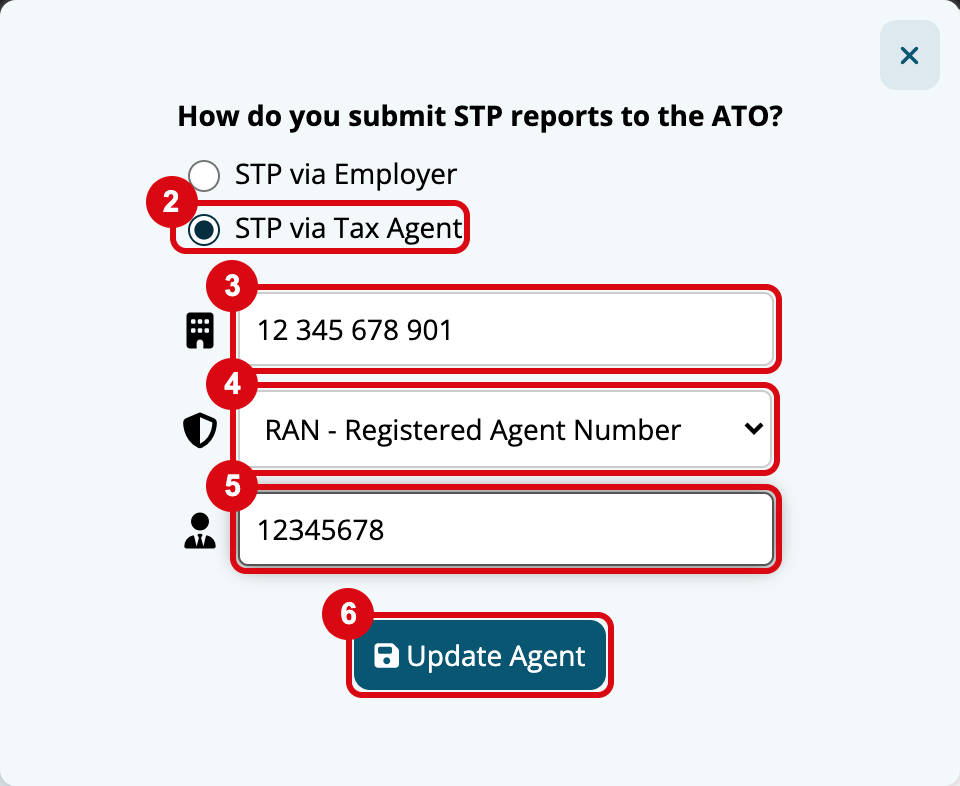
The card then shows STP via Agent with the agent's ABN and RAN or TAN. If you have more than one ABN, record the agent on each ABN they lodge for. To go back to lodging yourself, choose STP via Employer and click Update Agent.
Link the client's Software ID with the ATO
The ATO needs to know the agent lodges for the client through Microkeeper.
- The client navigates to Menu > Settings > General > Global, clicks STP Settings, and copies the number in ATO/SBR 'BMS ID' 'Software ID'.
- The client gives the Software ID to the agent.
- The agent attaches the client's Software ID in their Tax Agent Portal.
Lodge a pay run as a registered agent
The agent does this, logged in with their own username.
- Open your profile menu and click Business Switcher, then choose the client's business.
- Navigate to Menu > Payroll > Payruns, then run and lock the pay run as usual.
- In the Complete Payrun menu, click 2. Submit to ATO, then review and lodge as described in Lodge a Pay Run with STP.
When the ABN has an agent recorded, Sign ATO Agreement adds an As a Tax Agent declaration. It shows the agent's ABN and RAN or TAN, and you confirm that:
- you prepared the payroll report from the information the client supplied
- you've received a declaration from the client that the information is true and correct
- the client has authorised you to give the report to the ATO.
You sign the declaration with your own username, so lodge from your own login, not the client's. Microkeeper lodges the report with the agent's ABN and agent number.